

Pay with Bank Card on Binance, and save 20%


Introduction: Paying via Binance
Even if you do not have a Binance account yet, you can still pay with your bank card and save around 20% compared with standard card or PayPal checkout at HuskyBoost. Binance offers a straightforward fiat-to-crypto flow: buy USDT with your card, then send it to HuskyBoost. The process is quick and helps you avoid the higher fees that many traditional payment processors charge.
- You pay with your Visa, Mastercard, or another supported bank card;
- You receive USDT and send it via internal transfer—no on-chain fees for that step;
- Total setup is typically about 5–10 minutes from registration to payment.
This path suits players who want the same familiar card experience while keeping more of their budget for the actual boost. You stay in control of each step, and you can repeat the flow whenever you order again. Internal transfers on Binance are built for speed between accounts, which is why many HuskyBoost customers choose this method for larger or recurring orders.
HuskyBoost does not store your card data when you pay through Binance—you interact with Binance’s own checkout. Always log in only through official Binance domains and never share your Binance password with anyone claiming to be support. If a chat asks for your seed phrase or remote access, it is a scam; real HuskyBoost staff only need your order details and payment confirmation.
- Keep two-factor authentication enabled on Binance after signup;
- Use a unique password that you do not reuse on gaming forums;
- Save your transfer receipt until support marks the order as paid.
Register on Binance
Create your Binance account in a few steps. You only need basic details to get started. Use a strong password and an email you check often, because Binance will send confirmations and security alerts there.
- Open the Binance registration page and sign up;
- Enter your email and create a strong password;
- Complete any security checks and confirm your email via the link in your inbox.
After you log in for the first time, enable two-factor authentication if Binance prompts you. This protects your balance and withdrawals. You do not need advanced trading features for this guide—spot wallet access and Buy Crypto are enough to pay HuskyBoost.
Complete Verification
Quick verification takes about 5 minutes and is required to buy crypto with a card and use withdrawal features. Binance follows standard KYC rules to stay compliant. Have your ID ready in good lighting so photos stay clear.
- Open your account settings and go to the verification section;
- Upload a valid government-issued ID (passport or national ID);
- Complete the selfie step if prompted;
- Wait for review—many users are approved quickly for basic tiers.
Once verified, you can use Buy Crypto and send funds without unnecessary delays. If something is rejected, Binance usually explains what to fix; update the document image and resubmit. Higher limits may unlock later, but the basic tier is enough for typical HuskyBoost order sizes.
Regional rules can change which documents Binance accepts, so follow the on-screen checklist in your country profile. If you travel often, keep your profile address aligned with your primary residence to avoid extra reviews. Verification rarely blocks the whole flow for long—most gamers complete it in a single sitting.
Buy USDT with Card
After verification, purchase USDT directly with your bank card. This route usually costs less in fees than PayPal or many card gateways used at checkout. Match the amount to your HuskyBoost order total in stablecoin terms so you do not need a second top-up.
- Open Buy Crypto on Binance;
- Select fiat (e.g. USD) and cryptocurrency USDT;
- Choose Bank Card as the payment method;
- Enter the amount and complete the payment with your card.
Your USDT should appear in your spot wallet shortly after your bank confirms the transaction. Banks sometimes flag first crypto purchases; if a payment fails, confirm with your bank that online card purchases to Binance are allowed, then try again. Keep a record of the successful purchase amount for your own accounting.
Exchange rates and card fees appear before you confirm. Compare the final USDT amount with your HuskyBoost invoice so you send enough after any small rounding difference. If your order is in euros but you buy with USD on the card, the bank converts automatically—just ensure the USDT you receive covers the USDT total quoted by support.
Choosing Payment Settings
In the Buy Crypto flow, start with USD as your fiat currency and USDT as the asset. After you select USDT, you can switch the fiat currency from USD to EUR if you prefer. Then pick Bank Card as your payment method. The page lists the exact amount of USDT you will receive before you confirm.
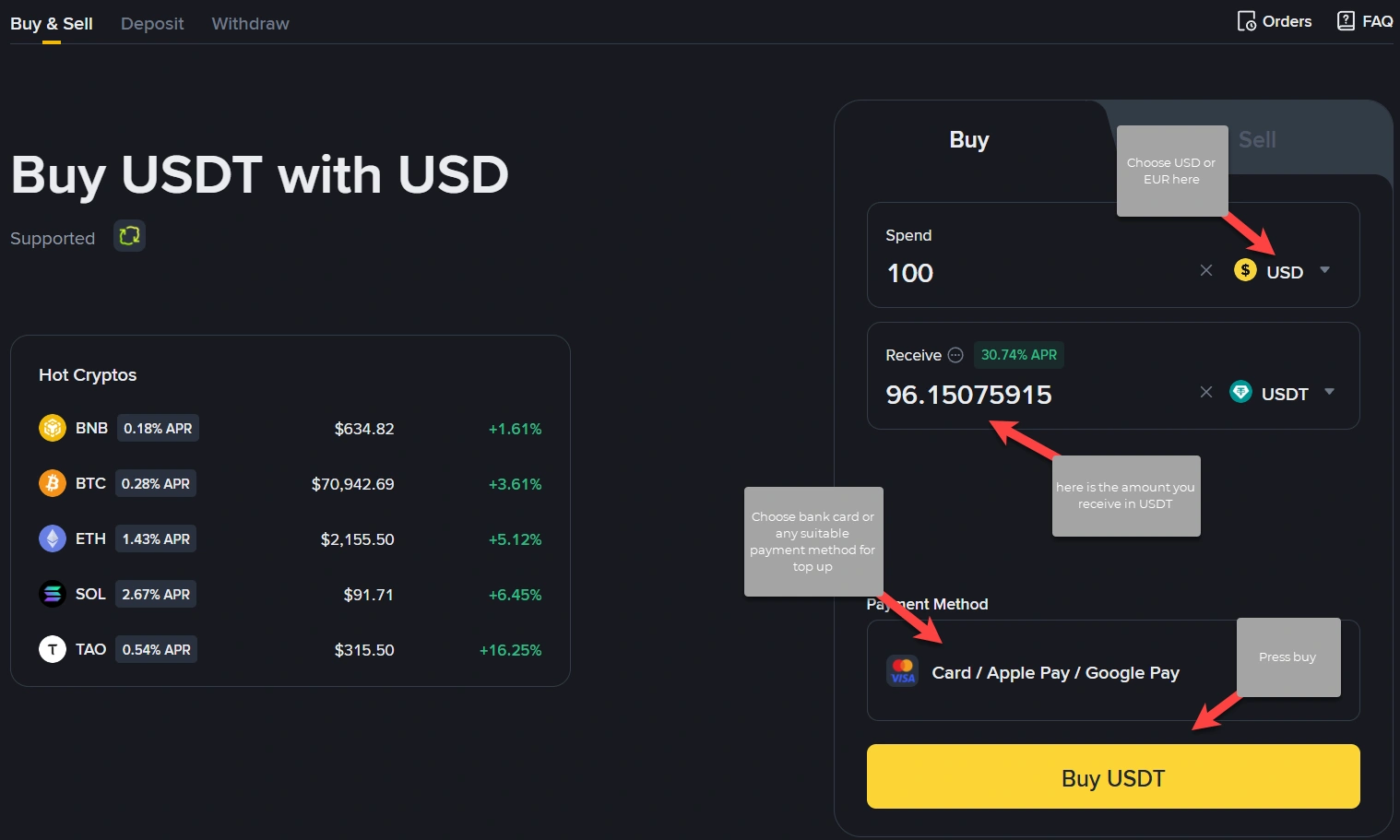
Open Binance Buy Crypto (USD / USDT)
Send USDT to HuskyBoost
When USDT is in your Binance account, send it to HuskyBoost using an internal transfer. Internal transfers on Binance are typically free and fast, with no blockchain network fee for that step. Always double-check the UID before confirming; transfers sent to the wrong UID cannot be reversed by HuskyBoost.
- Log in to Binance and open Withdraw for USDT;
- Select Internal Transfer and UID as the destination type;
- Paste the HuskyBoost UID: 142423699;
- Enter the amount and confirm the transfer.
Use the same network and asset type your order instructions mention if support gives extra detail. For internal transfer, you stay inside Binance’s system, which reduces delays compared with on-chain deposits that wait for block confirmations.
After you send, paste the internal transfer reference from your Binance history into HuskyBoost chat if the team asks for it—this speeds up manual matching during busy hours. If you sent the wrong asset, contact Binance support first; HuskyBoost cannot reverse third-party exchange mistakes. Double-check that the UID field shows exactly 142423699 with no extra spaces.
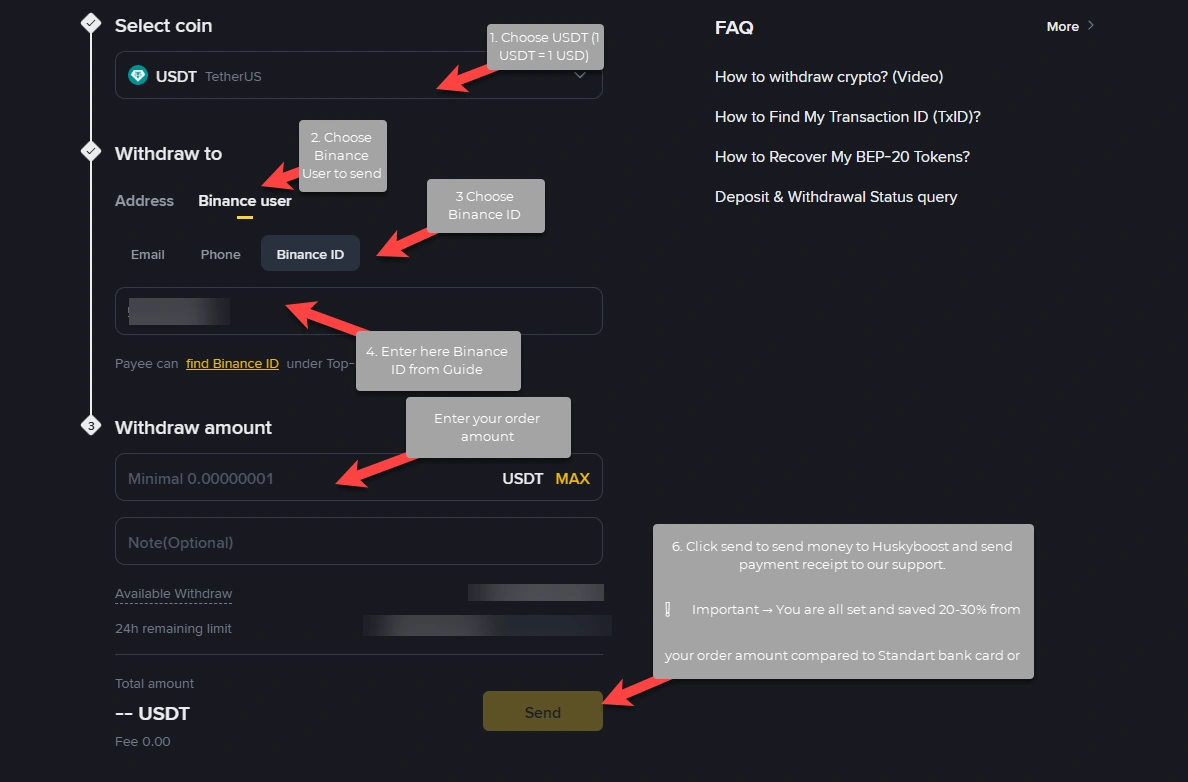
Internal Transfer Steps
Go to the USDT withdrawal page, choose Internal Transfer, then UID. Paste our UID 142423699, enter the amount, and confirm. After submission, you should see the transfer complete almost immediately in your history.
QR Code Alternative
If you use the Binance mobile app, you can pay using a QR code from our support. After you place your order, ask for the QR code in LiveChat or Discord during working hours. Our team will send it promptly so you can complete the transfer from your phone in seconds.
If sending by UID did not work for you, or you are worried about mistyping the number, do not rush. Wait until our support sends you a QR code, then open the Binance app and scan it—that is all. This way is simpler, and you cannot enter the wrong destination by hand.
- Request the QR code in support after your order is registered;
- Open the Binance app and use the scan feature;
- Confirm the amount and complete the transfer.
This flow is ideal on mobile if you already verified Binance on your phone. It also suits anyone who prefers not to copy a long UID. Keep the app updated so the scanner reads modern QR formats without errors.
Summary and Time
Total time: about 5–10 minutes from registration to completed payment.
By paying through Binance with your bank card, you can save roughly 20–30% compared with PayPal or standard card checkout at HuskyBoost, while still using the same familiar card. The money simply follows a more cost-efficient path, so you get more value for your boost.
- Fast registration and card purchase of USDT;
- Internal transfer to HuskyBoost UID 142423699;
- Optional QR code from support—easiest if UID transfer failed or you want zero typo risk.
Whenever you are ready for your next order, repeat the same flow: top up USDT if needed, internal transfer to the same UID, and keep your order ID handy in chat so support can match your payment instantly.