

Pay with Bank Card on Bybit, and save 20%

Introduction: Paying via Bybit
If you do not have a Bybit account yet, you can still pay by card and save around 20% compared with Standard Card or PayPal checkout. Bybit offers a streamlined fiat-to-crypto flow that allows you to buy USDT with your bank card and then send it directly to HuskyBoost. This method is fast, straightforward, and helps you avoid extra fees charged by traditional payment processors.
- You pay with your Visa, Mastercard, or other supported bank card;
- You receive USDT and send it via internal transfer—no blockchain fees;
- Total setup time is typically around 5–10 minutes from registration to payment.
Register on Bybit
The first step is to create an account on Bybit. Registration is quick and requires only basic information.
- Go to the Bybit website and click on Register;
- Enter your email address and create a secure password;
- Complete the captcha and agree to the terms of service;
- Verify your email via the confirmation link sent to your inbox.
After registration, you will have access to the main dashboard. Proceed to the next step to unlock buying and sending functions.
Complete Verification
Quick verification takes approximately 5 minutes and is required to buy crypto with a card and withdraw funds. Bybit uses a standard KYC process to comply with regulations.
- Navigate to your account settings and find the verification section;
- Provide a valid government-issued ID (passport or national ID card);
- Take a clear selfie as requested for identity confirmation;
- Wait for the automated review—approval is usually instant for basic tier.
Once verified, you can use the Buy Crypto feature and perform internal transfers without delay.
Buy USDT with Card
After verification, you can purchase USDT directly with your bank card. This avoids the higher fees associated with PayPal or third-party card processors used by many boosting services.
- Open the Buy Crypto section in your Bybit account;
- Select the fiat currency (USD or EUR) and the cryptocurrency (USDT);
- Choose Bank Card as the payment method;
- Enter the amount you wish to spend and complete the payment.
The purchased USDT will appear in your Spot wallet shortly after the transaction is confirmed by your bank.
Choosing Payment Settings
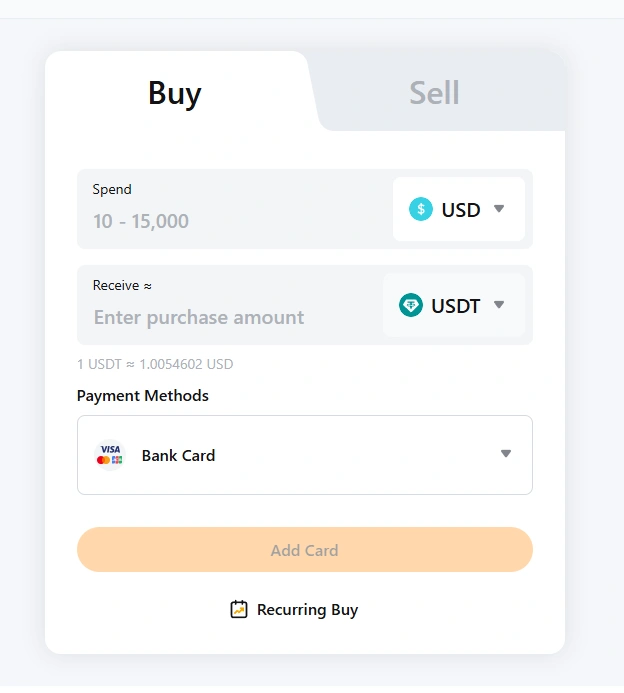
In the Buy Crypto flow, start by selecting USD as your fiat currency and USDT as the crypto to receive. After choosing USDT, you can switch the fiat currency from USD to EUR if you prefer. Then select the Bank Card option as your payment method.
Help screenshot:
Send USDT to HuskyBoost
Once you have USDT in your Bybit account, you need to send it to HuskyBoost using an internal transfer. Internal transfers are free and instant—no blockchain network fees or waiting times.
- Log in to Bybit and go to the withdrawal or assets section;
- Choose USDT as the currency to send;
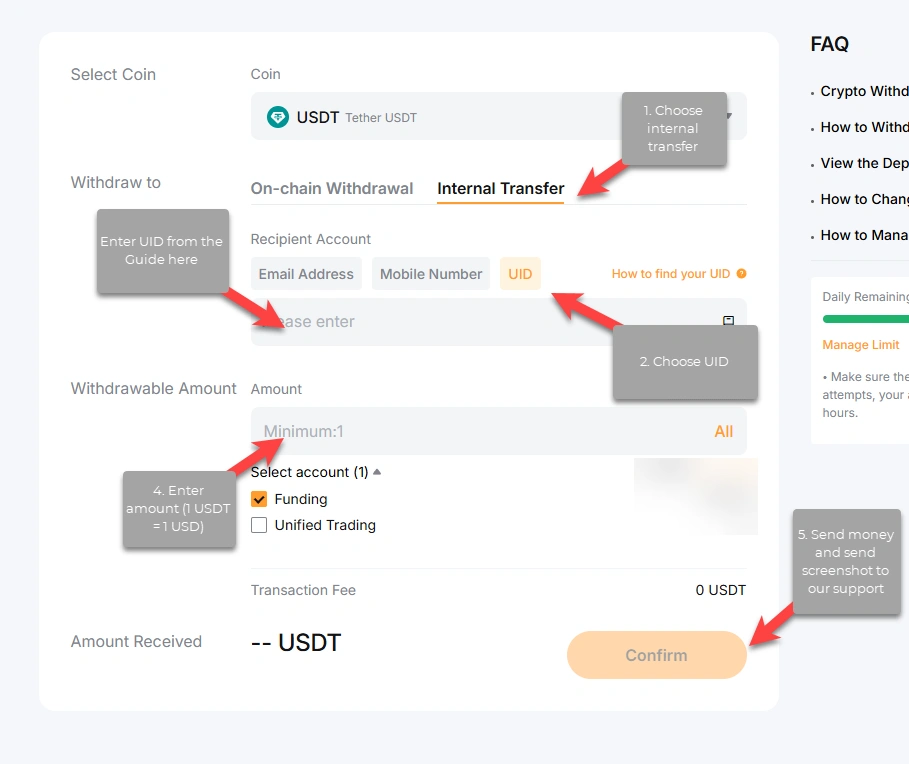
- Select Internal Transfer and then UID as the destination type;
- Paste the HuskyBoost UID: 117266448;
- Enter the amount and confirm the transfer.
Internal Transfer Steps
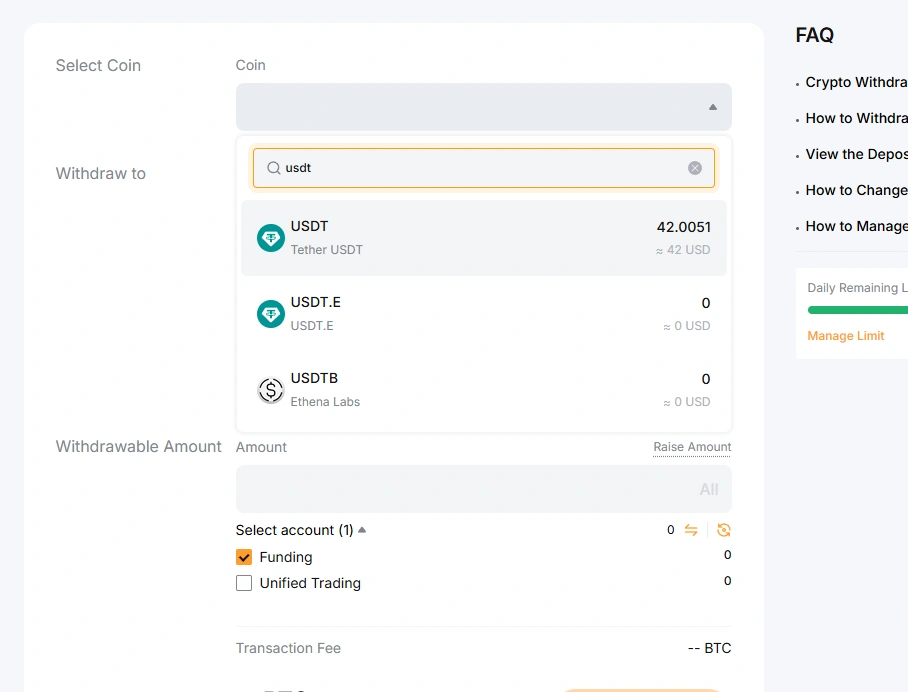
Navigate to Bybit Withdraw. Select USDT from the available assets. Choose Internal Transfer, then UID. Paste our UID 117266448 into the destination field and enter the amount you wish to send.
Help screenshots:
QR Code Alternative
If sending by UID did not work, or you are worried about entering the wrong recipient, wait for a QR code from our support. Then simply scan it in the Bybit app and confirm—that is all. This route is easier, and you cannot make a mistake with the destination.
After you place your order, ask for the QR in LiveChat or Discord during working hours; our team will send it promptly so you can finish the transfer in seconds on your phone.
- Request the QR code in LiveChat or Discord (especially if UID transfer failed or you want the safest option);
- Open the Bybit app and use the scan function;
- Confirm the amount and complete the transfer.
Summary and Time
Total time: approximately 5–10 minutes from registration to completed payment.
By using Bybit and paying with your bank card, you save around 20% compared with PayPal or standard card checkout. You still pay with your familiar Visa or Mastercard—the only difference is that the funds go through a more cost-efficient path, and you end up with more value for your boost.